Two ways to use it
As subagents to a cloud agent. Claude Code, Codex and any other MCP client can call Local AI’s tools directly. The agent hands them the simple, repetitive work and starts from prepared results, instead of doing that drudgery itself on cloud tokens.
Without a cloud agent, from the command line. The same capabilities, but as helpers for you: search code by meaning, triage a log, read an image, translate a document. It is the same index and the same models either way, so nothing is lost by starting here and adding an agent later.
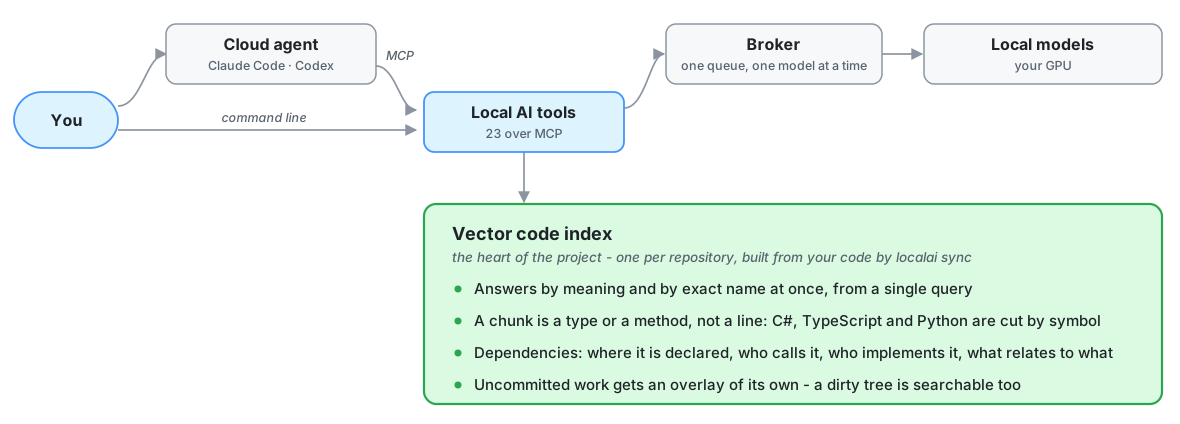
Why there is a broker in the middle. There is one per runtime directory —
%LOCALAPPDATA%\LocalAi, so one per Windows user — and it holds the queue.
That is how Claude, Codex and the command line all work at once without tripping over each
other, and why one model sits in video memory rather than four fighting over it.
Model processing is local by default. The broker sends your code and the prompts built
from it to Ollama at http://127.0.0.1:11434/, on this machine; a broker started with another
address sends them to that address. Which network interfaces Ollama itself listens on is
Ollama’s own setting. The update check is off by default. Models and missing prerequisites
are downloaded when you ask for them.
Local tools return results to the client that called them, including model answers and selected source excerpts. A cloud agent can include those results in requests to its cloud provider. Local inference therefore does not guarantee that returned content stays on your computer; the client’s configuration and data policy govern that transfer.